Novadontics blog

More Predictable Implant Dentistry: The Clinical Tools Built into Novadontics

From guided photography to full-arch diagnostics and implant logbooks, the Novadontics features that help practices deliver predictable implant care.

Tooth loss is increasingly common in an aging population, and dental implants are quickly becoming the standard of care because they can provide nearly equivalent function and appearance to natural teeth. Yet many dentists cannot offer predictable implant treatment at a reasonable cost, for three reasons:

  1. Lack of training, support, and access to standardized procedures
  2. High prices charged by major dental implant distributors to individual dental offices
  3. The difficulty and cost of inefficient, fragmented practice management systems

The result: many dentists cannot meet the demand for implant treatment, and they miss out on revenue, practice growth, and the chance to give patients the highest standard of care. At the same time, many patients cannot access or afford implant treatment, or worse, receive substandard care that leads to further pain, treatment, and expense.

An All-in-One Answer to a Complex Problem

Guided by dental implant experts and leading software developers, Novadontics created a patented, cloud-based practice management platform that combines office and procedure support with savings on high-quality dental supplies. The aim is to let more dentists offer implant treatment to more patients, at a reasonable cost and with predictable results.

Here are the implant-specific features inside the platform.

Photography Module: Clinical Photos Without the Guesswork

Good photographic documentation is key to successful treatment, especially for implant patients. But most dental practitioners are not professional photographers.

Novadontics solves this with a full Dental Photography Guide built directly into the photo uploading process. Each patient file lists the views essential to dental treatment. For each view, one click opens a pop-up with the related section of the guide, covering:

  • Camera type and settings
  • Any required auxiliary equipment
  • Technique
  • Patient instructions
  • Specific considerations for dentate versus edentulous patients
  • What to evaluate in the photo
  • Sample images

With this approach, any practitioner or staff member can capture predictable, meaningful images that support treatment planning and the procedures that follow.

Novadontics patient list open on a tablet with a keyboard

Implant Full-Arch Diagnostic Tools

Successful implant therapy starts with a thorough, methodical diagnostic exam. Full-arch (FA) cases are especially challenging, with many variables to consider.

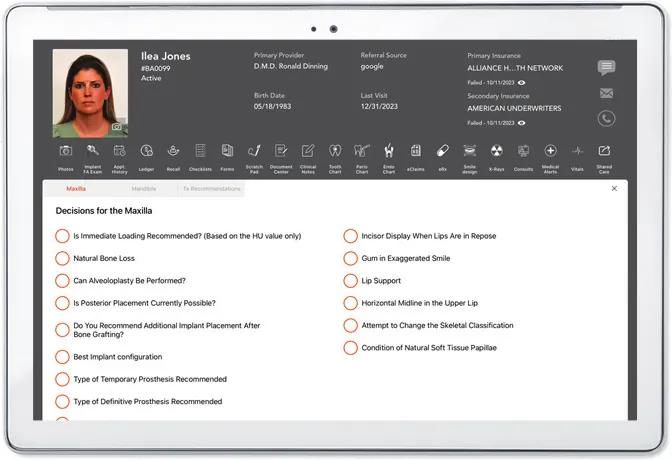
The integrated full-arch implant diagnostic exam flowchart takes the guesswork out of this step. It leads the provider through decisions for the maxilla and mandible, one step at a time. Each question in the checklist offers options, often with guidelines for choosing between them. You select options and enter measurements chairside as the exam happens, and everything is saved directly in the Implant FA Exam module in the patient file, ready for reference as treatment proceeds.

Smile Design

The Smile Design flowchart is another data collection tool built into the patient file. It takes the practitioner through each step of a detailed analysis of the patient's face and smile and the recording of clinical findings, with helpful information and reference images along the way. The completed analysis gives you the information you need for an esthetically pleasing, functionally sound smile restoration, and a happy, satisfied patient.

Implant Logbook

The electronic, interactive Dental Implant Logbook records and tracks detailed information about every implant placed in your office. Inside Novadontics, it fills itself automatically with the implant data entered in patient files. You can also enter and edit information directly, either as part of the Novadontics package or as a standalone feature.

This one-of-a-kind, copyrighted software supports future treatment planning and purchasing decisions. It lets you:

  • Search and sort by implant brand and size, surgical and loading protocols, bone density and stability measurements, and more.
  • See restoration dates coming up. An automatic reminder shows when implants are within 30 days of their projected restoration date, so staff can contact patients to schedule the restorative phase.
  • Export detailed reports on specific implant data for practice management or research.
  • Import x-rays from patient files to show bone levels over years of treatment.
  • Access your data on mobile devices, synced in real time.
  • Track your success rate. Mark failed implants with a date and reason for removal, and they are automatically calculated into your office's implant success rate, shown on the main Implant Logbook page.
Novadontics implant decision checklist for the maxilla on a tablet

Bone Graft Logbook

The electronic, interactive Bone Graft Logbook records and tracks every bone grafting procedure in your office. Like the Implant Logbook, it is populated automatically from patient files, and you can also enter and edit information directly in the module.

It tracks:

  • The type of procedure
  • The type, size, and volume of every graft
  • Brands of allografts, xenografts, and alloplasts
  • Membranes and additives
  • X-rays, imported to monitor bone levels over time
  • In case of graft failure, the date of failure and any related medical conditions

Checklists Module

The Checklists Module raises the standard of implant therapy in your practice with checklists and step-by-step protocols built into the Novadontics patient module. Checklists let you:

  • Minimize complications by confirming the patient is a good candidate for the proposed treatment and that all necessary data is collected
  • Follow protocols strictly by checking off steps as you perform them
  • Customize treatment by selecting options and adding notes
  • Access descriptions and illustrations that show the latest expert knowledge for specific procedures
  • Save completed checklists in the patient's file for future reference

Built for Implant Practices from the Ground Up

Novadontics' patented cloud-based practice management software is the first and only dental PMS built by dentists for the general and dental implant industry. The tools above are not add-ons bolted to a generic system. They are integrated into the Novadontics patient file, so implant and bone graft data entered in a patient file populates the logbooks automatically.

See the Implant Tools for Yourself

Ready to bring more predictability to your implant cases? Book a Free Demo and see the Implant Logbook, full-arch exam, and checklists in action.

Want the full feature overview? Download the free eBook: Implant Dentistry Features of the Novadontics Platform.

Frequently asked questions

What can I track in the Novadontics Implant Logbook?

You can search and sort data by implant brands and sizes, surgical and loading protocols, bone density and stability measurements, and more. The logbook also flags implants within 30 days of their projected restoration date, imports x-rays to show bone levels over time, exports detailed reports, and calculates your office's implant success rate from failed implants you mark.

Can the Implant Logbook be used without the full Novadontics platform?

Yes. Information can be entered and edited in the Implant Logbook either as part of the Novadontics package or as a standalone feature.

How does the Novadontics Photography module help my team take better clinical photos?

A full Dental Photography Guide is built into the photo uploading process. For each essential view, one click opens the related section of the guide, covering camera type and settings, auxiliary equipment, technique, patient instructions, dentate versus edentulous considerations, what to evaluate in the photo, and sample images.

Cover image for the Novadontics article More Predictable Implant Dentistry: The Clinical Tools Built into Novadontics

Free eBook

Implant Dentistry Features of the Novadontics Platform

This article is based on our free eBook. Get the full PDF, no sign-up needed.

Download the PDF

See Novadontics in action

Book a free, personalized demo and see how the platform would run your practice.

Book a Free Demo