Novadontics blog

Switch Your Dental Practice Management Software in 5 Simple Steps

Why switching your practice management software is less painful than staying stuck, and the 5-step Novadontics process that gets you live.

Switching practice management software can feel daunting for any dental practice, and even more so when you have used the same system for years. But as painful as change can be, it is not as painful as being stuck with a system that no longer works for you.

There will always be a learning curve. Still, the transition can quickly pay off in efficiency, cost savings, streamlined workflows, and better patient care and experience. And the sooner you switch, the sooner those benefits start.

Below: why practices switch to Novadontics, and exactly what to expect from onboarding.

Why Switch to Novadontics?

Running the day-to-day business of a dental practice can feel overwhelming, and it is fair to wonder how you could possibly find the time to start over with new software. With Novadontics, that small time investment is quickly rewarded with daily time and cost savings, because one all-in-one platform manages everything from marketing and the front office to patient care and business analysis.

Keep Your Practice Running Smoothly

Novadontics has the tools you need to keep the front office running efficiently, all integrated directly in the platform:

  • An easily customizable Appointment Book
  • Intuitive Clinical Notes
  • A cloud-based X-ray and CT Scan module
  • A Dashboard and Reports module that show valuable practice data at a glance
  • Nova SharedCare, which lets you share selected patient records with another provider in a HIPAA-compliant environment in a few clicks

Make Your Patients Smile with Convenient Care Options

Novadontics makes managing appointments and patient information easy for patients and staff alike, with:

  • Automated Appointment and Recall Reminders
  • Online New Patient Registration and HIPAA-Compliant Patient Forms
  • Online Patient Bill Pay
  • Customizable Birthday Messages, a simple way to build relationships with patients and create loyalty and referrals to friends and family

Help Your Practice Grow

Novadontics has partnered with Care Pulse, an online dental appointment booking app fully integrated with the practice management system. New patients can quickly find you and book online, and when they book through Care Pulse, the slot is filled automatically in your appointment book.

Provide Exceptional Patient Care

Novadontics gives you access to expert knowledge through:

  • The integrated Checklist Guidance module
  • Online video consultation with expert clinicians
  • A Continuing Education module with access to 300+ lectures and clinical videos from world-renowned speakers

Improve Your Bottom Line

Whether you are buying daily supplies or investing in capital equipment, the Novadontics Integrated Marketplace offers group-rate discounts that can have a significant impact on your bottom line. Novadontics has partnered with prominent, reputable manufacturers and suppliers to offer special discounts on high-quality products.
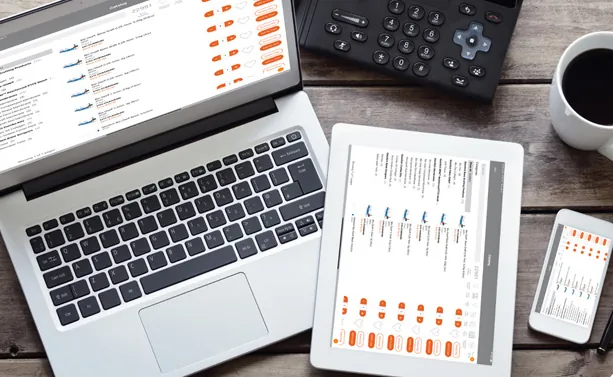
Novadontics dashboards on a laptop, tablet and phone on a desk

Your Data Moves with You

The biggest worry about switching is usually the data. Novadontics converts all of your existing practice management data in less than 2 weeks, and its experts help you through the process. Novadontics can migrate data from all major practice management systems, including:

  • Dentrix
  • EagleSoft
  • Open Dental Software
  • Denticon
  • SoftDent
  • PracticeWorks
  • And many more

The 5-Step Implementation Process

Novadontics is committed to making your move to its cloud-based system as painless as possible. Implementation follows five simple steps.

Step 1: Kick-Off Meeting

A dedicated Novadontics support team member reaches out to your front office team to schedule a meeting and begin the implementation process.

Step 2: Data Conversion

Novadontics migrates all of the data and images from your existing practice management software into your Novadontics practice account.

Step 3: Onboarding and Training

Your Novadontics support team member schedules a timeline of online training sessions and weekly meeting times. They also guide your staff through a 2-hour onboarding session in which all of your practice settings are entered into the software for your initial setup.

Step 4: Go Live

Once your office team has completed training, and any data and images added to your old system since the initial conversion have been brought over, your Novadontics platform goes live.

Step 5: Ongoing Support

Going live is not the end of the relationship. The Novadontics support team is available for chat, email, and phone assistance at any time. The goal is for every Novadontics subscriber to feel supported every step of the way.

Laptop showing the Novadontics bone grafting catalog

What the Switch Gets You

The payoff is the reason to start. Once you are live, the transition can pay dividends in four areas:

  • Efficiency, with scheduling, clinical notes, imaging, and reporting in one platform instead of several
  • Cost savings, from daily time savings and group-rate Marketplace discounts
  • Streamlined workflows, with patient reminders, forms, and payments automated
  • Better patient care and experience, backed by checklists, expert consultation, and continuing education

One platform to run your practice. One team to help you get there.

A Quick Switching Checklist

Use this list to plan your own move:

  • Get ready for the kick-off. A Novadontics support team member will reach out to your front office team, so decide who on your team will take that call.
  • Confirm your current system. Note which practice management software you use today so the data conversion can be planned.
  • Block the 2-hour onboarding session. This is where your practice settings get entered.
  • Hold the weekly meetings. Keep training on the calendar until your team is comfortable.
  • Plan the cutover. Go live once training is done and recent data has been brought across.

Ready to Make the Switch?

See what your practice would look like on Novadontics before you commit. Book a Free Demo and we will walk you through the platform and the switch.

Want the full guide to bring to your team? Download the free eBook: How to Switch Your Practice Management Software.

Frequently asked questions

How long does it take to convert my existing practice management data to Novadontics?

Novadontics converts all of your existing practice management data in less than 2 weeks, with its experts helping you through the process.

Which practice management systems can Novadontics migrate data from?

Novadontics can migrate data from all major practice management systems, including Dentrix, EagleSoft, Open Dental Software, Denticon, SoftDent, PracticeWorks, and many more.

What are the steps in the Novadontics implementation process?

There are five: a kick-off meeting, data conversion, onboarding and training (including a 2-hour onboarding session to enter your practice settings), go live, and ongoing support by chat, email, and phone.

Cover image for the Novadontics article Switch Your Dental Practice Management Software in 5 Simple Steps

Free eBook

How to Switch Your Practice Management Software

This article is based on our free eBook. Get the full PDF, no sign-up needed.

Download the PDF

See Novadontics in action

Book a free, personalized demo and see how the platform would run your practice.

Book a Free Demo